Essential Excel Concepts: Logical Functions
We are accustomed to using logical functions in our daily lives whether we realize or not. In fact, we are taught how to learn as children using them.
“If you do X, then Y will happen.”
In Excel, we can use logical functions to help us make data backed decisions. Logical functions allow you to evaluate conditions to based off if a condition is TRUE or FALSE.
I will explain logical functions by building on complexity of each example to help build your Excel concepts toolkit.
Let us start with the most basic scenario—a comparison of cell values.
Here we will compare values in respective columns. Let us use the following table:

We want to flag if the Math score is larger than the Science score here. To do this, we will perform a logical comparison statement. If the statement is TRUE, Excel will display TRUE in the cell. If the comparison is FALSE, Excel will display FALSE.
In the Logical Test column, we will type:

The results will be as follows, as our table automatically fills the results:

This is an extremely power tool since now we can expand on these results to add additional layers of data analysis.
Typically, this type of logical test will be the first step in multiple step process in analyzing data. Now we will expand on this example to use the next logical function to learn—the IF ( ) function.
The TRUE or False result from our logical comparison is nice. However, let us put the test into more meaningful language. We are going to program our spreadsheet output to display Math if TRUE and Science if FALSE. Recall, we are comparing the Math and Science scores to see which subject had a higher score.
When we type in “= IF,” Excel will prompt us for the necessary criteria needed:

The syntax is simply our logical test to perform, the value to display if the condition is TRUE, and the value to display if the condition is FALSE.
To get our desired results, we will use the following IF function:
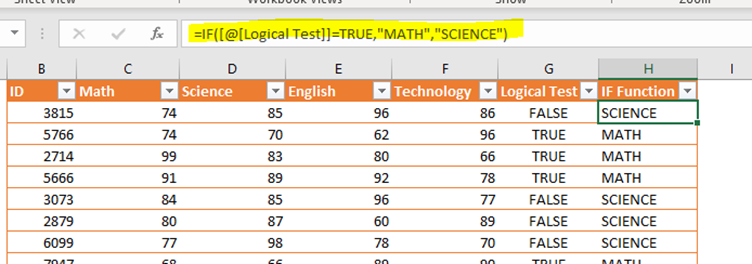
As we can see, the table values have been updated based off our criteria in our logical function.
We will now explore the world of using IF with another function. In this case, we will explore IF () with AND (). Think of IF () and AND() as nested functions.
By nested functions, I am referring to a function living inside another function—like composite functions in high school algebra class.
Here is the notation more specifically:
IF (AND ( ) )
We are used to the criteria needed for an IF function. But let us look at the syntax for the AND ().
For the AND(), we will think of the criteria as multiple comparison statements that result in a TRUE or FALSE value.

The AND () value will be the logical test criteria in the IF function. In other words, if the AND portion is TRUE or FALSE within the IF (), we will code of IF () to do some type of action. That was a lot to read, so let us move on to an example.
For this example, we want to reward individuals if all their scores are above 85. If this is TRUE, Scholar Award will be displayed. Otherwise (FALSE), No Award will be displayed.
Here are the results with the function to show the results.

Notice that ID 3073 did not receive a Scholar Award? That is because our criteria are to be greater than 85.
We have only scratched the surface here. But the functions we covered will be a nice start to exploring the universe of logical functions. In a future lesson, I will teach the IFS () and SWITCH () functions, which are more advanced logical functions.


Comments